
The Estel Tech Anywhere Application Server for IIS is currently in beta. For more information on the Estel Tech Anywhere Application Server for IIS, check out this overview webinar on-demand.
Sometimes a request can fail for reasons outside of the Estel Tech Anywhere Application Server for IIS. IIS has a component call Failed Request Tracing that can be used to track down why a request is failing.
 In fact, the Estel Tech Anywhere Application Server for IIS participates in failed request tracing, meaning that it will write messages to the failed request log too. Though if there was a problem rendering an .a5w page finer details will be in the Xbasic error and/or trace logs.
This installation guide recommends including the Tracing feature when configuring IIS. If you included the Tracing feature under Health and Diagnostics you're 98% of the way to using Failed Request Tracing. If you didn't, go back and add that feature.
Here is a quick primer on using Failed Request Tracing. You can Google "IIS Failed Request Tracing" for more details.
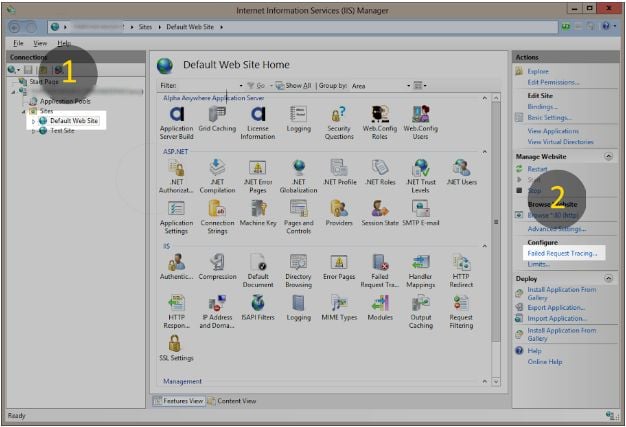
- Select your web site in IIS Manager.
- In the right hand "Actions" pane click on "Failed Request Tracing..." and then enable it. Change the log path if needed.
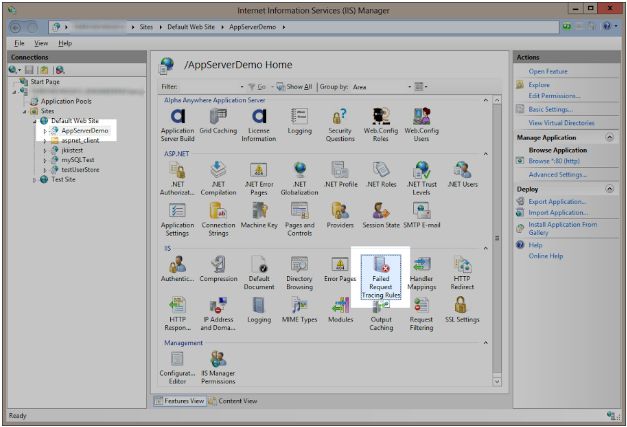
A web application published from Estel Tech Anywhere Developer Edition already has its web.config set to trace HTTP response codes of 400 and above so enabling Failed Request Tracing should be all that needs to done. This setting can be seen by selecting web application and then the Failed Request Tracing item in the IIS group.
Now make the request from the browser to load the page. Once you’ve gotten the error go to the failed request logs folder to and double click on the frxxxxx.xml file and to view it.
Note: If you want to clean up the request logs only delete the .xml files. Don't delete the freb.xsl. The freb.xsl file is a pain in the neck to recreate.










Comment